TP4 : Panoramas (English version) Posez une question sur ce TP!
HW4: Panoramas (Version française) Ask us a question!
Déclaration relative à l'IA : Pour chaque section de ce travail, veuillez indiquer si vous avez utilisé un modèle d'intelligence artificielle (e.g., un assistant d'IA tel que ChatGPT, Gemini, Claude, Midjourney, etc.) et, si oui, le prompt exact que vous avez utilisé ainsi qu'un résumé dans vos mots de l'approche employée dans votre remise. Si vous n'avez pas utilisé de l'IA pour une section, veuillez résumer votre approche en un court paragraphe.
AI disclosure: For each section of this assignment, please state whether you used an artificial intelligence model (e.g., an AI assistant such as ChatGPT, Gemini, Claude, Midjourney, etc.) and, if so, the exact prompt you used as well as a summary in your own words of the approach used in your submission. If you did not use AI for a section, please summarize your approach in a short paragraph.
Résumé
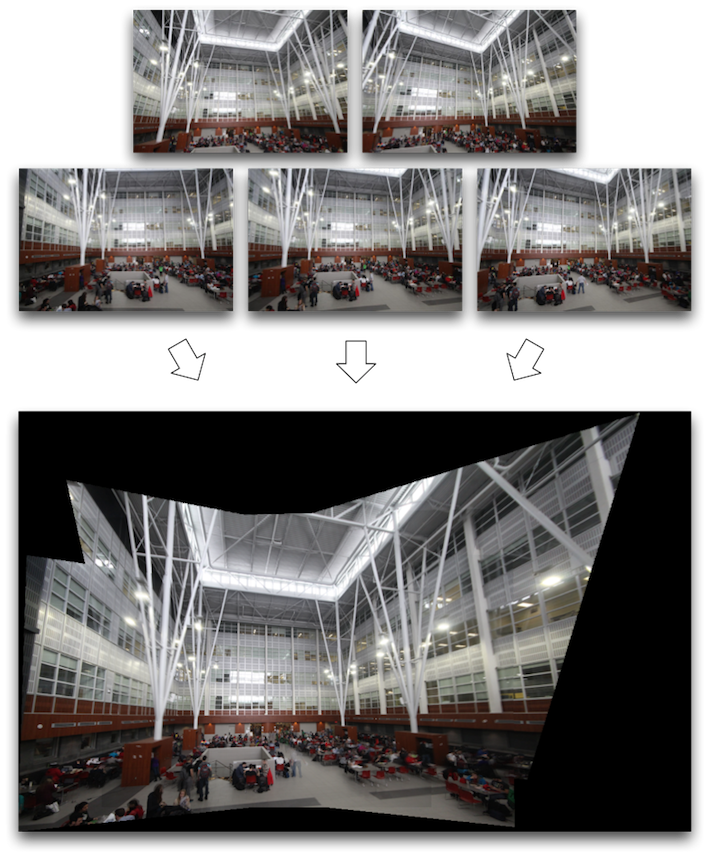
L'objectif de ce travail est d'implémenter un algorithme vous permettant de créer une mosaïque d'images. Une mosaïque combine plusieurs images ayant des champs de vue se chevauchant afin de produire un panorama ou une image à haute résolution. La plupart des approches d'assemblage d'images nécessitent un chevauchement très exact et des expositions identiques entre les images pour produire des résultats sans joint apparent. Lors du travail, vous allez apprendre à calculer des homographies et à les utiliser pour déformer les images. Pour le travail, utilisez les photos suivantes : images.zip.
Vous ferez d'abord le recalage (appariement des caractéristiques similaires dans les différentes images afin de transformer des ensembles différents de données dans un seul système de coordonnées) manuellement. Ensuite, vous aurez à développer une méthode de détection de points d'intérêt et d'appariement automatiques.
En Python, il existe déjà des fonctions effectuant en grande partie la tâche qui vous est demandée, par exemple dans le module skimage.transform. Vous êtes autorisés et encouragés à utiliser skimage.transform.warp et skimage.transform.estimate_transform pour appliquer les homographies et en estimer les paramètres à partir de paires de points. Bien entendu, il existe également plusieurs autres fonctions très utiles que vous êtes invités à utiliser (par exemple, pour la résolution de systèmes linéaires, l'inversion des matrices, interpolation linéaire, etc.).
Overview
The goal of this assignment is to implement an application of image mosaicking. Image mosaicking (or stitching) is the process of combining multiple images with overlapping fields of view to produce a panorama or high-resolution image. Most approaches to image stitching require nearly exact overlaps between images and identical exposures to produce seamless results. Along the way, you will learn how to compute homographies, and how to use them to warp images. For the homework, use those images: images.zip.
You will first do the registration (matching of similar features in different images to transform different sets of data into one coordinate system) manually. Then, you will implement a way to automatically detect and match interesting features in images.
In Python, there are some functions that can do much of what is needed, for example in the skimage.transform package. You are allowed and encouraged to use skimage.transform.warp and skimage.transform.estimate_transform to apply homographies and to estimate their parameters from point correspondences. On the other hand, there exists a number of other very helpful functions (e.g. for solving linear systems, inverting matrices, linear interpolation, etc.) that you are welcome to use.
Réchauffement (20% pour 4105, 15% pour 7105)
Warmup (20% for 4105, 15% for 7105)
Avant de créer des mosaïques, il est important de savoir comment transformer une image. En guise de réchauffement, vous devrez implémenter la fonction
imgTrans = appliqueTransformation(img, H);
qui applique une homographie H à une image img, et retourne l'image transformée imgTrans. Nous vous recommandons d'utiliser skimage.transform.warp pour appliquer la transformation.
Pour tester votre code, utilisez l'image suivante:
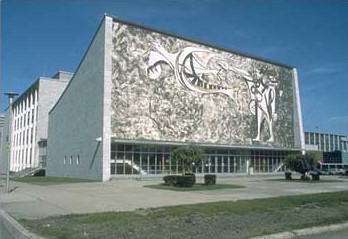
et appliquez les deux homographies suivantes:
H1 = np.array([[0.9752, 0.0013, -100.3164], [-0.4886, 1.7240, 24.8480], [-0.0016, 0.0004, 1.0000]])
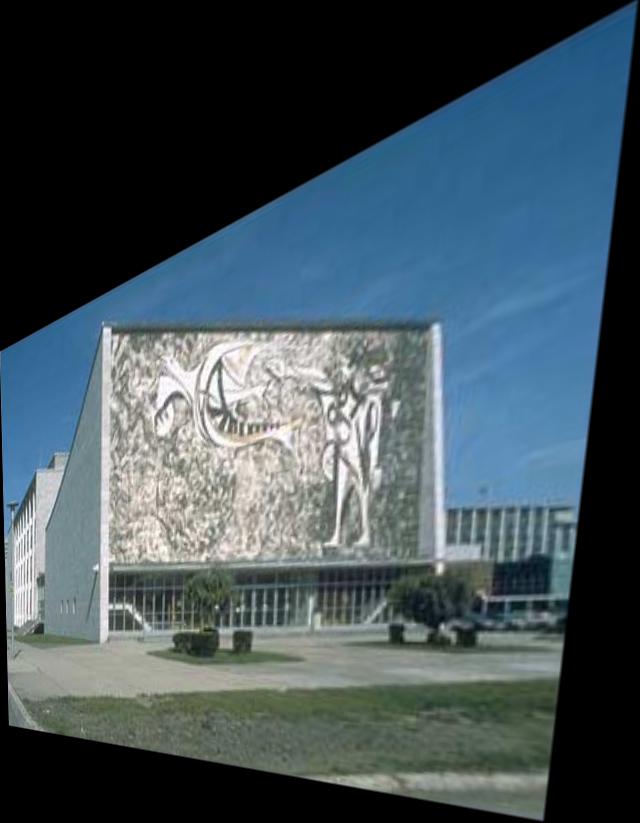
H2 = np.array([[0.1814, 0.7402, 34.3412], [1.0209, 0.1534, 60.3258], [0.0005, 0, 1.0000]])
Vous devriez obtenir l'une ou l'autre de ces deux images (en fonction de la façon dont votre code gère les bordures de l'image) :
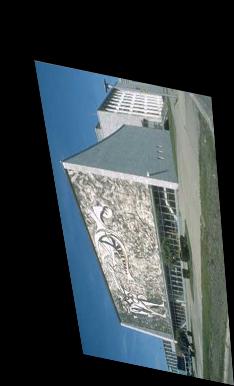
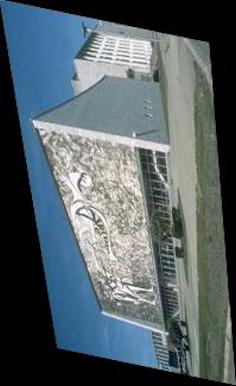
Attention : les coordonnées de l'image finale peuvent être négatives ou dépasser la largeur de l'image originale en $x$ et/ou en $y$ (ceci est le cas pour l'homographie H1 ci-haut). Votre code doit être en mesure de gérer ce cas.
Before creating any mosaic, it is important to know how to transform an image. As a warmup, you will have to implement the function
imgTrans = applyTransformation(img, H);
which applies the homography H to the image img, and returns the transformed image imgTrans. We recommend using skimage.transform.warp to apply the transformation.
To test your code, use the following image:
and apply the two transformations:
H1 = np.array([[0.9752, 0.0013, -100.3164], [-0.4886, 1.7240, 24.8480], [-0.0016, 0.0004, 1.0000]])
H2 = np.array([[0.1814, 0.7402, 34.3412], [1.0209, 0.1534, 60.3258], [0.0005, 0, 1.0000]])
You should obtain one of the following (depending on how your code manages the image borders):
Warning: the coordinates of the final image can therefore be negative or higher than the size of the original image in $x$ and/or $y$ (this is the case for the H1 transformation above). Your code must be able to handle this case.
Appariement manuel (45% pour 4105, 40% pour 7105)
Manual matching (45% for 4105, 40% for 7105)
Détails
L'algorithme d'assemblage de photos consiste à :
- Apparier des points caractéristiques
- Calculer l'homographie
- Déformer les images grâce à une transformation projective
- Fusionner les images en une mosaïque
Chacune des étapes de l'algorithme sont décrites plus bas.
Details
The image stitching algorithm can be summarized as:
- Features matching
- Compute homography
- Projective warping
- Blending the images into a mosaic
All of these steps are described further down.
1. Appariement de caractéristiques
Comme il a été mentionné dans le cours, le calcul d'une transformation globale comme une homographie nécessite des paires de correspondances. Le calcul d'une homographie nécessite au moins 4 paires de correspondances. Dans un premier lieu, sélectionnez manuellement des points d'intérêt se retrouvant dans les deux images.
Établir une correspondance entre des points peut être délicat. Une erreur de quelques pixels peut produire d'énormes changements dans l'homographie estimée. La façon manuelle d'établir les correspondances est d'utiliser la souris. Vous pouvez créer vous-même une petite interface, ou encore adaptez le code du TP3.
Nous vous fournissons les points de correspondance à utiliser pour les données «Serie1» du répertoire «1-PartieManuelle» des images fournies pour vous aider à valider votre code. Vous pouvez charger ces points avec : np.loadtxt(path, delimiter=",", dtype=np.float64), si vous avez importé numpy avec import numpy as np . En utilisant ces points, vous devriez obtenir un résultat similaire à l'image suivante:
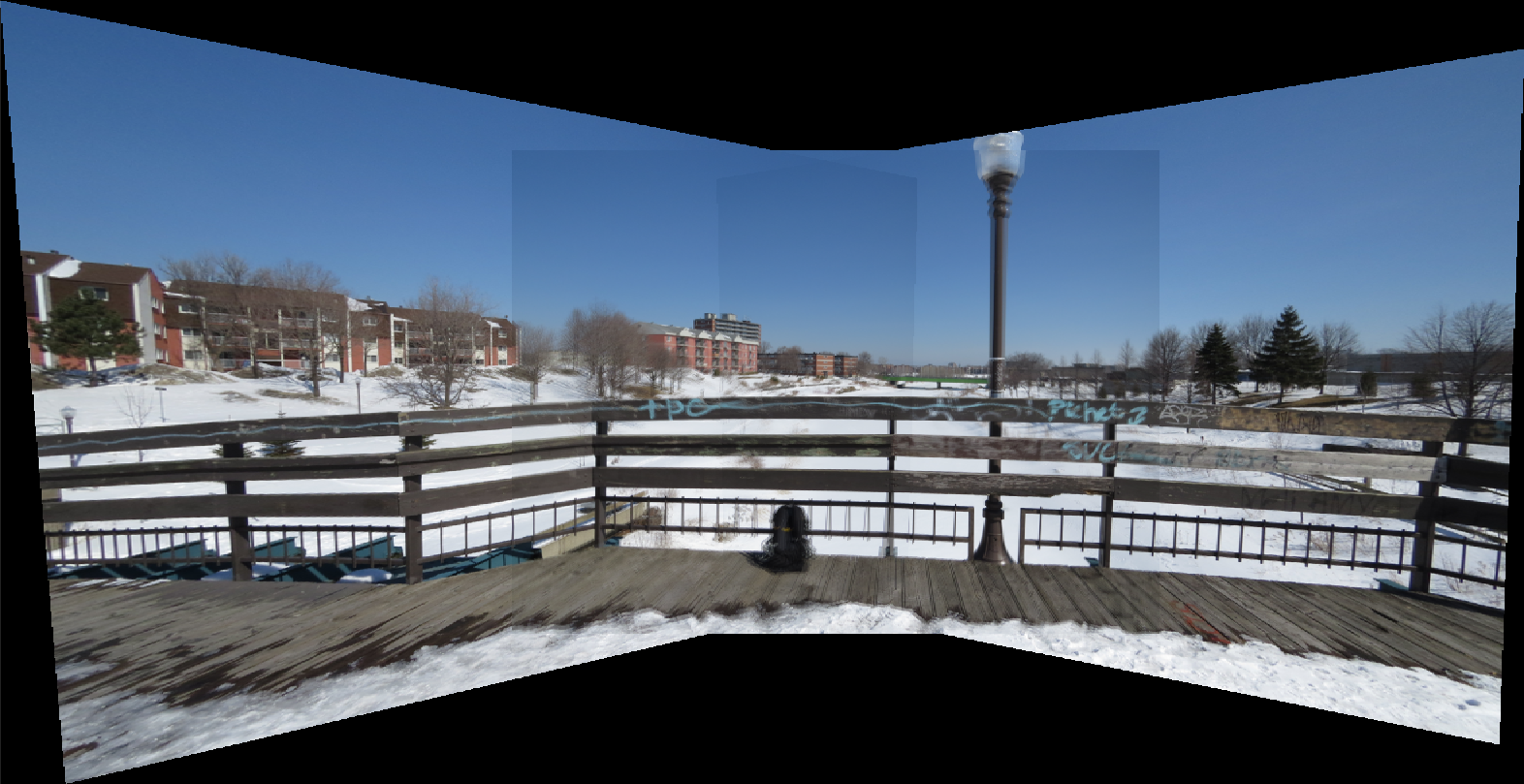
Vous devrez sélectionner les points vous-mêmes pour les autres ensembles de photos.
1. Features matching
As it was mentioned in class, the calculation of a global homography transformation requires pairs of correspondences. The calculation of a homography requires at least 4 pairs of correspondences. In this part of the homework, you will have to manually select these interest points in both images.
Establishing point correspondences is a tricky business. An error of a couple of pixels can produce huge changes in the recovered homography. The typical way of providing point matches is with a mouse-clicking interface. You can write your own or adapt code from HW3.
We provide correspondences for the "Serie1" data in the folder "1-PartieManuelle" of the provided images to help you validate your code. You can load these points with: np.loadtxt(path, delimiter=",", dtype=np.float64), if you have imported numpy with import numpy as np. Using these points, you should obtain a result similar to the following image:
You will have to select your points manually for the other sets.
2. Calculer l'homographie
Avant de pouvoir déformer les images en appliquant votre fonction appliqueTransformation de votre réchauffement, vous devez tout d'abord estimer cette transformation pour chaque paire d'images. La transformation à estimer est une homographie (ou une transformation projective) : $\mathbf{p}^\prime= \mathbf{H}\mathbf{p}$, où $\mathbf{H}$ est la matrice $3 \times 3$
possédant 8 degrés de liberté (elle est définie à un facteur d'échelle près). Il est possible d'estimer l'homographie grâce à un minimum de $n=4$ paires de points correspondants (donc 8 points au total) prélevés sur les deux images $(\mathbf{p}^\prime, \mathbf{p})$. Pour calculer $\mathbf{H}$, créez un système de $2n$ (8) équations linéaires pouvant être représenté sous la forme $\mathbf{A}\mathbf{h} = 0$, où $\mathbf{h}$ est un vecteur contenant les 9 inconnues de $\mathbf{H}$ tel que vu dans le cours.
Pour estimer l'homographie à partir des paires de points, utilisez skimage.transform.estimate_transform (avec le modèle 'projective') pour estimer la transformation.
En pratique, implémentez la fonction suivante:
H = calculerHomographie(im1_pts, im2_pts)
où im1_pts et im2_pts sont des matrices $n \times 2$ contenant les positions $(x, y)$ des $n$ correspondances entre les deux images et H est l'homographie calculée à partir de ces points.
Il est plus robuste de pré-normaliser les points im1_pts et im2_pts au préalable, tel que recommandé par Richard Hartley dans son désormais célèbre article « In defense of the 8-point algorithm ». Pour ce faire, vous pouvez simplement soustraire la moyenne des points et diviser par leur écart-type.
Nous vous conseillons de tester votre fonction calculerHomographie en dessinant deux quadrilatères (comme dans les capsules), en calculant l'homographie à partir de leurs coins, et de transformer le premier quadrilatère selon l'homographie obtenue. Vous devriez obtenir exactement les coordonnées du second!
2. Compute homography
Before you can warp your images into alignment using your warmup, you need to recover the parameters of the transformation between each pair of images. In our case, the transformation is a homography $\mathbf{p}^\prime= \mathbf{H}\mathbf{p}$, where $\mathbf{H}$ is the $3 \times 3$ matrix
$$ \mathbf{H} = \left[ \begin{array}{ccc} a & b & c \\ d & e & f \\ g & h & i \end{array} \right] \,, $$with 8 degrees of freedom (it is defined up to scale). The homography can be estimated from a minimum of $n=4$ pairs of corresponding points (so 8 points in total) on the two images $(\mathbf{p}^\prime, \mathbf{p})$. To compute $\mathbf{H}$, create a system of $2n$ (8) linear equations that can be represented with $\mathbf{A}\mathbf{h} = 0$, where $\mathbf{h}$ is a vector containing the 9 unknowns of $\mathbf{H}$ as seen in class.
To estimate the homography from the point pairs, use skimage.transform.estimate_transform (with the 'projective' model) to estimate the transform.
In practice, implement the following function:
H = computeHomography(im1_pts, im2_pts)
where im1_pts and im2_pts are n-by-2 matrices holding the $(x, y)$ locations of $n$ point correspondences from the two images and H is the recovered homography matrix.
It is more robust to normalize the points im1_pts and im2_pts before estimating the homography, as recommended by Richard Hartley in his famous paper "In defense of the 8-point algorithm". To do so, you can simply subtract the mean and divide by the standard deviation.
We recommend you test your computeHomography function by drawing two quadrilaterals (just like in the videos), compute the homography from their corners, and transform the first one according to the homography. You should obtain exactly the coordinates of the second one!
3. Déformation projective
Maintenant que vous connaissez les paramètres de l'homographie, vous devez déformer vos images à l'aide de celle-ci. Pour ce faire, vous n'avez qu'à utiliser la fonction appliqueTransformation que vous avez écrite pour le réchauffement.
3. Projective warping
Now that you know the parameters of the homography, you need to warp your images using this homography. All you need to do is to use the function applyTransformation that you wrote in the warmup.
4. Fusionner les images en une mosaïque
Une façon simple de créer une mosaïque est de déterminer (manuellement) une image de référence, et de déformer les autres images pour les aligner avec l'image de référence. Le choix de l'image de référence est important : prendre simplement la première peut donner un résultat trop déformé. Pour fusionner les images ensemble, plusieurs options sont possibles pour déterminer la valeur des pixels aux endroits où les deux images se chevauchent. Par exemple, vous pourriez conserver le pixel d'une des deux images. Vous pourriez aussi conserver la valeur maximale des pixels des deux images. Une troisième option serait de calculer la moyenne pondérée des deux images. Vous pouvez expérimenter avec diverses options et choisir celle que vous préférez.
4. Blend the images into a mosaic
A simple way to create a mosaic is to choose (manually) a reference image and warp the other images to align with it. Choosing a good reference image is important: using the first one may yield an overly distorted result. To blend the images together, several options are possible for the pixel values in overlapping regions. For example, you could keep the pixel from one of the two images. You could also keep the maximum of the two pixels. A third option is to compute a weighted average of the two images. You can experiment with various options and choose the one you prefer.
Appariement automatique (15% pour 4105, 10% pour 7105)
Automatic matching (15% for 4105, 10% for 7105)
Maintenant que vous avez une implémentation fonctionnelle de l'algorithme d'assemblage de photos, vous devez remplacer l'étape de sélection manuelle de points d'intérêt par une méthode automatique. L'algorithme comporte les étapes suivantes :
- Détecter les points d'intérêt et extraire leurs descripteurs dans chaque image
- Apparier les descripteurs entre les deux images
- Calculer l'homographie à partir des appariements
Assurez-vous que l'appariement des points clefs se fasse entre images consécutives (p.ex. image 1-2, 2-3, 3-4) : apparier des images qui ne se chevauchent pas ne fonctionnera pas. Comme pour la partie manuelle, le choix d'une bonne image de référence est important ; prendre la première peut donner un résultat trop déformé.
Détection, descripteurs et appariement : Employez skimage.feature.SIFT pour la détection et l'extraction des descripteurs, et skimage.feature.match_descriptors pour l'appariement (voir la documentation SIFT de scikit-image). Vous pouvez aussi utiliser tout autre détecteur, descripteur ou méthode d'appariement de votre choix si vous préférez un autre algorithme que SIFT.
Estimation de l'homographie par RANSAC
Les appariements automatiques contiennent souvent des erreurs. Vous devez estimer l'homographie de façon robuste aux faux appariements. Utilisez l'implémentation de RANSAC de scikit-image : skimage.measure.ransac. Voir l'exemple Robust matching using RANSAC.
Voici un exemple de code pour estimer l'homographie en utilisant SIFT et RANSAC :
import numpy as np
from skimage.color import rgb2gray
from skimage.feature import SIFT, match_descriptors
from skimage.measure import ransac
from skimage.transform import ProjectiveTransform


def estimate_homography_sift(img_ref, img_other):
	"""Estimer l'homographie entre deux images en utilisant SIFT et RANSAC."""

    gray1 = rgb2gray(img_ref)
    gray2 = rgb2gray(img_other)

    sift1 = SIFT()
    sift1.detect_and_extract(gray1)
    kp1, desc1 = sift1.keypoints, sift1.descriptors

    sift2 = SIFT()
    sift2.detect_and_extract(gray2)
    kp2, desc2 = sift2.keypoints, sift2.descriptors

    matches = match_descriptors(
        desc1, desc2,
        cross_check=True,
        max_ratio=0.8
    )

    if len(matches) < 4:
        raise ValueError("Pas assez d'appariements pour estimer l'homographie")

    # Convertir de (y, x) à (x, y) pour l'homographie
    pts_ref = kp1[matches[:, 0]][:, [1, 0]]
    pts_other = kp2[matches[:, 1]][:, [1, 0]]

    model_robust, inliers = ransac(
        (pts_other, pts_ref),
        ProjectiveTransform,
        min_samples=4,
        residual_threshold=2,
        max_trials=100
    )

    if model_robust is None:
        raise RuntimeError("RANSAC a échoué")

    return model_robust.params
Now that you have a working implementation of the image stitching pipeline, you will replace the manual point selection with an automatic method. The algorithm consists of the following steps:
- Detect interest points and extract their descriptors in each image
- Match descriptors between the two images
- Compute the homography from the matches
Make sure that keypoint matching is done between consecutive frames (e.g., image 1-2, 2-3, 3-4); matching between non-overlapping images will fail. As in the manual part, choosing a good reference image is important: using the first one may yield an overly distorted result.
Detection, descriptors, and matching: Use skimage.feature.SIFT for detection and descriptor extraction, and skimage.feature.match_descriptors for matching (see the scikit-image SIFT documentation). You may also use any other detector, descriptor, or matching method of your choice if you prefer a different algorithm than SIFT.
RANSAC for homography
Automatic matches often contain outliers. You must estimate the homography in a way that is robust to incorrect matches. We encourage you to use scikit-image's RANSAC implementation: skimage.measure.ransac. See the Robust matching using RANSAC.
Here is an example of code to estimate the homography using SIFT and RANSAC:
import numpy as np
from skimage.color import rgb2gray
from skimage.feature import SIFT, match_descriptors
from skimage.measure import ransac
from skimage.transform import ProjectiveTransform

def estimate_homography_sift(img_ref, img_other):
	"""Estimate the homography between two images using SIFT and RANSAC."""

    gray1 = rgb2gray(img_ref)
    gray2 = rgb2gray(img_other)

    sift1 = SIFT()
    sift1.detect_and_extract(gray1)
    kp1, desc1 = sift1.keypoints, sift1.descriptors

    sift2 = SIFT()
    sift2.detect_and_extract(gray2)
    kp2, desc2 = sift2.keypoints, sift2.descriptors

    matches = match_descriptors(
        desc1, desc2,
        cross_check=True,
        max_ratio=0.8
    )

    if len(matches) < 4:
        raise ValueError("Not enough matches to estimate homography")

    # Convert from (y, x) to (x, y) for the homography
    pts_ref = kp1[matches[:, 0]][:, [1, 0]]
    pts_other = kp2[matches[:, 1]][:, [1, 0]]

    model_robust, inliers = ransac(
        (pts_other, pts_ref),
        ProjectiveTransform,
        min_samples=4,
        residual_threshold=2,
        max_trials=100
    )

    if model_robust is None:
        raise RuntimeError("RANSAC failed")

    return model_robust.params
Vos images (20%)
Your images (20%)
Testez votre algorithme entièrement automatique sur vos propres images! Si vous prenez vos photos sans trépied, faites bien attention à ne pas tourner la tête trop significativement... rappelez-vous, le centre de projection doit être le même pour toutes les images pour que ça fonctionne bien. Vous devez tester votre algorithme sur au moins deux scènes différentes et chaque scène doit contenir un minimum de 4 photos.
Test your fully automatic algorithm on your own images! If you take photos without a tripod, be careful not to move your head too much off-center... remember, the center of projection must be the same for all images for mosaics to work well. You must test your algorithm on at least two different scenes and you must take at least 4 photographs per scene.
Crédits supplémentaires
Essayez une de ces idées pour approfondir vos connaissances (et augmenter votre note) :
- (jusqu'à 5% chacun) Utilisez des homographies pour combiner des images de façons intéressantes et créatives. Voici quelques suggestions :
- Ajouter un graffiti sur un édifice ou un dessin à la craie sur le sol.
- Remplacer un panneau sur la route par une photo de vous ou votre famille.
- Créer une mosaïque en effectuant un mélange d'images prises à des moments différents (jour vs nuit) ou au cours de différentes saisons.
- Créer une mosaïque en effectuant un mélange d'une image historique avec une moderne d'un même endroit.
- Créer une mosaïque intéressante/étrange comme, par exemple, une mosaïque avec plusieurs copies d'une même personne.
- (jusqu'à 10%) Meilleur mélange : exploitez votre code du TP2 et utilisez une pyramide (ou une pile) laplacienne au lieu de calculer une moyenne entre les images se chevauchant.
- (jusqu'à 10%) Panorama cylindrique à 360 degrés : Au lieu d'une mosaïque avec projection planaire, utilisez une projection cylindrique. Effectuez une déformation cylindrique sur toutes vos images et assemblez-les en utilisant uniquement des translations. C'est une façon de produire un panorama de 360 degrés. L'inconvénient de cette approche est la nécessité de connaître les paramètres intrinsèques de votre caméra (longueur focale et les coefficients de distortion radiale) ainsi que d'avoir pris les photos exactement horizontales (l'utilisation d'un trépied vous est fortement suggérée si vous voulez capturer vos propres images). Le répertoire « 3-ProjCylindrique » dans le fichier qui vous est donné contient deux séries d'images pouvant être utilisées pour cet exemple. Les distances focales des images sont disponibles dans l'entête EXIF de ces fichiers.
- (jusqu'à 5%) Ajoutez la détection de coins caractéristiques et leur description sur plusieurs échelles et démontrez son utilité.
- (jusqu'à 10%) Essayer d'autres détecteurs et descripteurs que le SIFT, et comparer leurs forces et faiblesses.
- (jusqu'à 15%) Implémentation de l'algorithme de reconnaissance de panorama. Avec un ensemble d'images non ordonnées, dont certaines font parties d'un panorama, vous devez automatiquement découvrir les images formant le panorama sous-jacent et assembler ces images ensemble (comme dans cet article de Brown et Lowe).
Extra credit
Try one of these ideas to increase your understanding on this subject (and increase your score):
- (up to 5% each) Use homographies to combine images in interesting and creative ways. Here are a few suggestions:
- Put fake graffiti on buildings or chalk drawings on the ground.
- Replace a road sign with your family portrait.
- Create a mosaic by spatially blending images taken at different times (day vs. night) or during different seasons.
- Create a mosaic by spatially blending a historic photograph with a modern picture of the same place.
- Create an interesting/bizarre mosaic, like the ones with multiple copies of the same person.
- (up to 10%) Better blending: exploit your code from HW2 and use Laplacian pyramid (or stack) blending instead of computing the mean of overlapping images.
- (up to 10%) 360-degrees cylindrical panorama: Instead of a planar-projection mosaic, do a cylindrical projection instead. Perform a cylindrical warp on all your input images and stitch them together using translation only. This is one way to produce a full 360 degree panorama. The downside is that this method places more requirements on your camera (you need to know the focal length and radial distortion coefficients), and your data (the images have to be exactly horizontal -- use a tripod). The "3-ProjCylindrique" folder in the file provided contains two image series you can used to perform this. The focal lengths are available inside the EXIF headers of the images.
- (up to 5%) Add multiscale processing for corner detection and feature description and demonstrate its usefulness.
- (up to 10%) Try other detectors and descriptors than SIFT, and compare their strengths and weaknesses.
- (up to 15%) Implement panorama recognition. Given an unordered set of images, some of which might form panoramas, you need to automatically discover and stitch these panoramas together. This is described in this Brown and Lowe paper.
Livrables
Deliverables
Comme lors des travaux précédents, celui-ci sera remis dans un format page Web et il n'a pas besoin d'être esthétiquement agréable : ne faites que décrire ce que vous avez fait.
Rappel : pour chaque section, indiquez votre déclaration relative à l'IA comme précisé en haut du travail.
Vous devez inclure dans votre rapport les parties suivantes. Les séries d'images sont disponibles dans le fichier images.zip. Répartition des points : réchauffement 20% (4105) / 15% (7105), appariement manuel 45% (4105) / 40% (7105), appariement automatique 15% (4105) / 10% (7105), vos images 20%. Les crédits supplémentaires (N%) s'ajoutent au total; pour le cours 7105, la note de base totalise 85%, les bonus sont donc nécessaires pour atteindre 100%.
- Réchauffement (20% pour 4105, 15% pour 7105) : décrivez brièvement votre approche et affichez le résultat de l'application des deux homographies
H1etH2sur l'image pouliot.jpg. - Appariement manuel (45% pour 4105, 40% pour 7105) : décrivez brièvement votre approche et affichez le résultat de votre algorithme de génération de mosaïques sur les 3 groupes d'images dans le répertoire « 1-PartieManuelle ». Pour la « Serie1 », vous pouvez utiliser les points fournis; pour les autres séries, identifiez manuellement les points de correspondance. Affichez les points sélectionnés et illustrez les étapes de votre algorithme. Commentez vos résultats.
- Appariement automatique (15% pour 4105, 10% pour 7105) : décrivez brièvement votre approche et affichez le résultat de votre algorithme automatique de génération de mosaïques sur les 3 groupes d'images dans le répertoire « 2-PartieAutomatique ». Affichez les points appariés automatiquement et illustrez brièvement les étapes. Commentez vos résultats.
- Vos images (20%) : affichez les résultats de votre algorithme automatique appliqué sur les deux scènes que vous aurez capturées vous-même, les images individuelles et les points appariés. Commentez vos résultats.
- (N%) Expliquer les crédits supplémentaires que vous avez implémentés, avec illustrations. Si cela s'applique, montrez le « avant » et le « après » et démontrez l'avantage de l'approche.
Idées pour les discussions
L'objectif des discussions dans vos rapports est que vous nous fassiez part de vos réflexions sur vos résultats. Tentez d'être précis(es) dans vos descriptions. Voici quelques idées :
- Commentez sur la qualité des résultats. Sont-ils à la hauteur de vos attentes? Y a-t-il des régions du panorama où les problèmes sont plus visibles?
- Quand ça fonctionne, commentez tout de même sur ce qui fait que ça fonctionne.
- Si vous avez rencontré des problèmes sur certaines scènes, décrivez ces problèmes et expliquez comment vous avez tenté de les résoudre. Tentez d'expliquer pourquoi ça fonctionne mieux sur certaines scènes plutôt que d'autres.
- Si vos algorithmes échouent sur certaines images, décrivez les problèmes et expliquez pourquoi ils surviennent selon vous;
- Décrivez, le cas échéant, les ajustements que vous avez apportés à l'approche proposée.
As in the previous homework, this one will be handed in a webpage format. Remember: the aesthetics of the website will not be evaluated, but it is important that the information be presented clearly.
Reminder: for each section, include your AI disclosure as specified at the top of the assignment.
Below are the parts you must include in your report. The image sets are available in the images.zip file. Grade breakdown: warmup 20% (4105) / 15% (7105), manual matching 45% (4105) / 40% (7105), automatic matching 15% (4105) / 10% (7105), your images 20%. Extra credit (N%) is added on top; for 7105 the base total is 85%, so bonus is needed to reach 100%.
- Warmup (20% for 4105, 15% for 7105): briefly describe your approach and show the result of applying the two homographies
H1andH2on the image pouliot.jpg. - Manual matching (45% for 4105, 40% for 7105): briefly describe your approach and show the results of your mosaicking algorithm on the 3 image groups from the folder "1-PartieManuelle". For "Serie1", use the points provided; for the other sets, manually click on corresponding points. Show the points you have selected, and illustrate the steps of the algorithm. Explain your results.
- Automatic matching (15% for 4105, 10% for 7105): briefly describe your approach and show the results of your automatic mosaicking algorithm on the 3 image sets from the "2-PartieAutomatique" folder. Show the points that were matched automatically, and briefly illustrate the steps. Comment on your results.
- Your images (20%): show the results of your automatic algorithm applied on the two scenes you have captured yourself, the individual images and the matched points. Comment on your results.
- (N%) Explain all the extra credit you have implemented. Illustrate these explanations. Also, if applicable, show correctly the "before" and "after" and show the advantage of your approach.
Ideas for discussions
The main objective is that you share your thoughts on your results with us. No need to write a novel, just try to be precise. Here are some ideas:
- Comment on the quality of the results. Do they live up to your expectations? Are there any regions of the panorama where the problems are more visible?
- Even if it works, comment on the fact that it works.
- If you have encountered problems on some scenes, describe these problems and explain how you tried to solve them. Try to explain why it works better on some scenes than others.
- If your algorithms fail on some scenes, describe the problems and explain why they occur in your opinion;
- Describe, if applicable, the adjustments you made to the proposed approach.
Remise
Handing in procedure
Pour la remise de votre travail, créez un fichier tp4.zip qui contient:
- Votre rapport en format HTML dans un dossier
tp4/rapport. Vos images doivent être dans un dossiertp4/rapport/imageset votre page principale doit êtretp4/rapport/index.html. Assurez-vous que vos images sont incluses avec des chemins relatifs, afin que les images puissent être chargées depuis l'ordinateur du correcteur! Nous vous recommandons de sauvegarder les images en format JPG avec une qualité de 90. - Votre code doit être dans un dossier
tp4/code. N'incluez pas les images que vous avez utilisées pour produire vos résultats dans ce dossier qui ne sont pas affichées dans votre rapport, car cela générera des fichiers très volumineux.
Nous vous conseillons fortement d'identifier clairement les principales « portes d'entrée » de votre code (ex : main_rechauffement.py, main_manuel.py, main_automatique.py, etc.). Cela permettra à votre correcteur de s'y retrouver plus facilement !
Finalement, veuillez téléverser votre fichier tp4.zip sur le portail des cours avant le 25 mars 2026 à 23h59. Pour toutes questions concernant la procédure de remise ou le travail lui-même, posez vos questions sur PAX!
For this homework, you must create a tp4.zip file which contains:
- Your report in an HTML format inside a folder named
tp4/rapport. Your images for this web page should be inside a folder namedtp4/rapport/imagesand your main page should betp4/rapport/index.html. Make sure your images are included with relative paths, so the images can load from the evaluator's computer! We recommend saving images in JPG format with quality 90. - Your code should be put inside the folder
tp4/code. Do not include the images you have used to generate your results inside this folder and that are not shown in your report, as this will likely generate huge files.
You should clearly identify the "entry points" to your code (ex: main_warmup.py, main_manual.py, main_automatic.py, etc.). This will help the grading!
Finally, you should upload this file (tp4.zip) on the "portail des cours" before March 25th 2026, 23h59. For any question regarding the submission process or the project as such, ask your questions on PAX!
Beware! The file size limit on monPortail is 250MB.
Remerciements
Merci à Alyosha Efros d'avoir créé le TP original qui a servi d'inspiration pour celui-ci!
Thanks
Many thanks to Alyosha Efros for creating the assignment which inspired this one!